How It Works
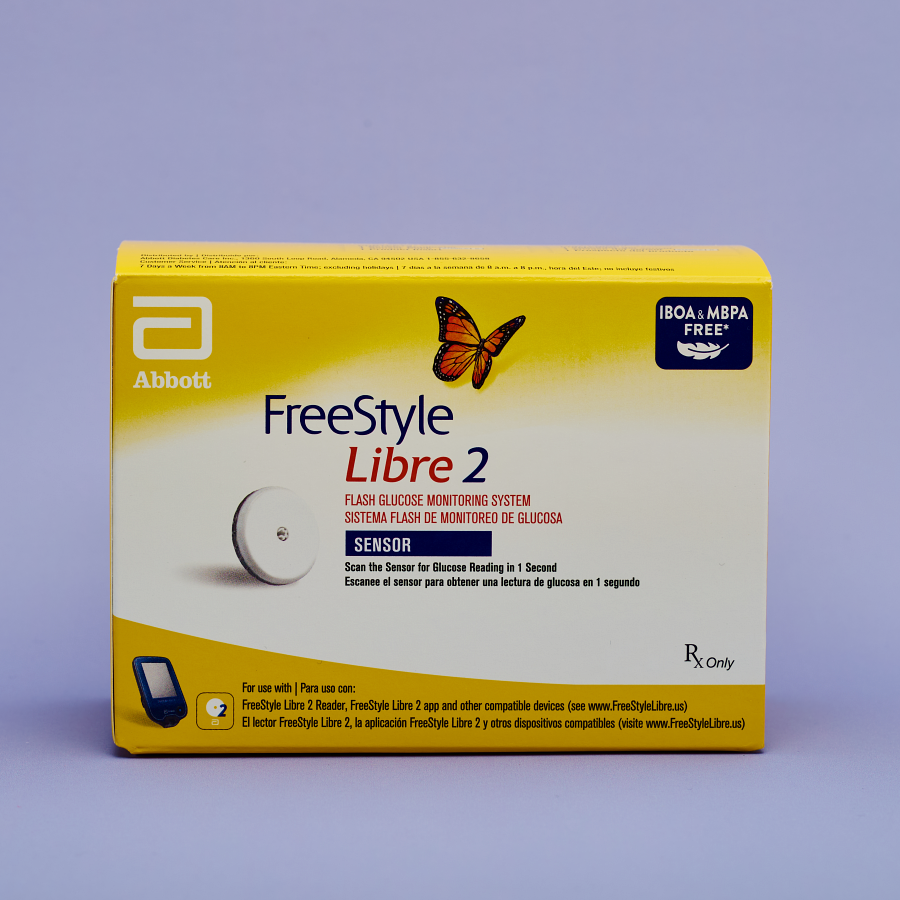
The FreeStyle Libre 2 system works through two main components: the sensor and the reader (or app) that provides the glucose readings.
- Sensor: A small sensor is applied just under the skin on the back of the upper arm. This sensor measures glucose levels every minute throughout the day. It is designed to be worn continuously for up to 14 days.
- Reader and app: People using the FreeStyle Libre 2 system can see their glucose readings by using the included handheld reader or downloading the free smartphone app. The system sends real-time data directly to your smartphone or reader, and can be configured for alerts.
| Quick Facts | |
|---|---|
| Common Brands | FreeStyle Libre 2 System |
| Drug Class | Continuous glucose monitor (CGM) |
| Generic Status | Generic is not available |
| Availability | Prescription only |
Dosing
As a continuous glucose monitor, the FreeStyle Libre 2 does not have “doses” in the traditional sense. The sensor is designed to be worn for 14 days. The sensor pack will come with instructions that explain how to apply and remove it, but this is a general overview:
- Wash your hands and the application site. Before applying the sensor, wash and dry your hands and the skin of the application site with plain soap and water. Clean the area with an alcohol wipe and allow it to air dry.
- Apply the sensor to the back of your upper arm. Remove the sensor from the package and push it firmly onto your skin. Gently pull the applicator away.
- Wait 1 hour. After an hour, the FreeStyle Libre 2 system will start providing glucose readings. Follow the instructions in the app to scan the new sensor. For the physical reader, turn it on and select “start new sensor.” Hold it within 1.5 inches of the sensor to scan it and begin receiving readings.
- Replace the sensor after 14 days (or sooner if it becomes loose). Slowly pull up on the edge of the sensor’s adhesive to remove it.
Note: Dosing information below is educational only. Your prescribing physician will determine your specific dose based on your individual health needs. Always follow your healthcare provider’s instructions for exact dosing.
Uses
FDA-Approved Uses
The FreeStyle Libre 2 CGM sensor is FDA-approved to manage type 1 and type 2 diabetes.
Off-Label Uses
You may see the FreeStyle Libre 2 CGM sensor prescribed for uses that are not “FDA-approved.” This is a common and legal practice called “off-label” prescribing, where a doctor uses their clinical judgment to prescribe a drug for a different (but well-researched) purpose.
There are currently no common off-label uses for the FreeStyle Libre 2 CGM sensor.
Get Savings Updates for the FreeStyle Libre 2 CGM Sensor
Join our mailing list for exclusive deals and more.
Side Effects
The most common side effect with the FreeStyle Libre 2 CGM sensor is mild skin irritation at the application site. The FreeStyle Libre 2 sensor generally doesn’t cause serious side effects, but there are some possible risks to be aware of.
Common Side Effects
- Mild skin irritation at the application site
- Mild discomfort at the application site
Serious Side Effects
Serious side effects are rare, but it’s important to know what to look for if they do occur. Stop using the FreeStyle Libre 2 CGM sensor and call your doctor immediately if you experience:
- Inaccurate readings due to vitamin C: Taking more than 500 mg of vitamin C (ascorbic acid) supplements while wearing the FreeStyle Libre 2 CGM sensor can cause falsely high glucose readings. This is dangerous because it may mask low blood sugar levels (hypoglycemia).
- Low or high blood sugar: There is a possibility that the sensor readings do not match your physical symptoms. If you feel like you’re experiencing low or high blood sugar but the FreeStyle Libre 2 reading doesn’t reflect that, perform a fingerstick test to be sure.
- Skin reactions: If you experience significant redness, swelling, or irritation around the sensor, it may be necessary to remove it.
Call your doctor immediately if you experience any concerning or prolonged symptoms.
Pharmacist Tips
New Sensors Have a 1-Hour “Warmup” Period
When you first apply a new sensor, you’ll need to wait 60 minutes (1 hour) after application before you can check your glucose readings.
Rotate Through Application Sites
The Libre 2 sensor is approved for placement on the back of the upper arm. When it’s time to switch sensors (every 14 days), choose a different spot on the back of your arm to avoid skin irritation and discomfort.
Prepare Your Skin Before Applying
Wash and dry your hands thoroughly. Wipe the chosen area on your arm with an alcohol wipe and let it dry.
Store at Room Temperature
To function properly, the sensors should be stored at temperatures between 36°F and 82°F.
Remove the Sensor Before Medical Imaging
MRIs, CT scans, and high-frequency electrical heat (diathermy) treatments can damage the sensor and lead to incorrect readings. If you are scheduled for one of these tests, tell your provider beforehand that you’re using the FreeStyle Libre 2 system.
Do Not Reuse Sensors
Reusing sensors or sharing them with others increases the risk of infection.
Avoid Body Scanners and X-Ray Machines
Do not take the FreeStyle Libre 2 CGM sensor through full-body scanners or put it through x-ray machines at the airport. It’s unknown if they could affect the sensor. Instead, ask security personnel for a hand-wand check, visual inspection, or walk-through metal detector.
Safely Dispose of Used Sensors and Applicators
The applicator contains a needle mechanism. Screw the used applicator and lid back together and dispose of them in an appropriate medical sharps container or biohazard bag. The sensor itself can be thrown away as electrical waste.
Drug Interactions
Certain medications and substances can interact with the FreeStyle Libre 2 CGM sensor, potentially affecting its ability to provide accurate glucose readings. For example:
- Vitamin C (ascorbic acid): Taking more than 500 mg of vitamin C per day can affect the sensor’s accuracy, causing it to display glucose readings that are higher than they actually are. Verify the content of multivitamins, cold remedies, and other supplements to see how much vitamin C they contain before using them with this system. If you’re not sure if something is safe to take with the Libre 2, ask your doctor.
Always give your doctor and pharmacist a complete list of all your medications, vitamins, and supplements to check for potential interactions.
FAQs
Do I still need to scan the sensor if it has Bluetooth alarms?
While the FreeStyle Libre 2 sends real-time glucose readings and alerts to your smartphone, you still need to scan at least every 8 hours to see a 24-hour glycemic snapshot.
Why does my sensor reading not match my fingerstick number?
The sensor measures glucose in the interstitial fluid (fluid just below the skin), not directly in the blood like a fingerstick. There is a physiological lag between blood sugar and interstitial fluid sugar. If your symptoms do not match the reading, or if you suspect the reading is inaccurate, it’s recommended to verify with a fingerstick test.
Can I wear the sensor during an MRI or CT scan?
No. It is advised to remove the FreeStyle Libre 2 sensor before undergoing an MRI, CT scan, or diathermy treatment. These tests can damage the sensor and lead to incorrect glucose data.
Why do I get a “Signal Loss” alarm when my phone is right next to me?
For the alarms to function, your phone or reader must be within 20 feet of you at all times. If you are using a smartphone, your Bluetooth setting must be turned on. If Bluetooth is off or the device is out of range, the signal will be lost.
Is the FreeStyle Libre 2 waterproof enough for swimming or hot tubs?
The FreeStyle Libre 2 sensor is water-resistant, but not waterproof. It’s generally safe for showering, swimming, and hot tubs as long as you spend less than 30 minutes in the water and don’t submerge it deeper than 3 feet.
Can I put the sensor on my stomach or thigh instead of my arm?
No. The FreeStyle Libre 2 sensor is only designed to work when placed on the back of the upper arm.
Why does the sensor fall off before the 14 days are up?
If the sensor becomes loose, do not try to reattach it. It’s recommended to remove it and apply a new one. To prevent adhesion issues in the future, ensure your skin is clean, dry, and prepped with an alcohol wipe before applying the sensor.
Does this sensor work with an insulin pump?
No, the FreeStyle Libre 2 sensor does not work with an insulin pump. However, the Libre 3 and Libre 2 Plus sensors can be compatible with an insulin pump.
Can I use my phone and the reader device at the same time?
Yes, you can use either the handheld reader or the smartphone app.
Is FreeStyle Libre 2 approved for gestational diabetes?
No. The FreeStyle Libre 2 CGM system is not approved for use on pregnant people. Let your provider know if you are currently pregnant or planning to become pregnant.
How do I turn off the loud alarms at night?
You can turn on “Silent Mode” in the app to turn off alarms for up to 6 hours.
Why does the sensor say “LO” instead of a number?
This indicates that the glucose level is below 20 mg/dL. Check your glucose levels with a fingerstick test.
Can I take Tylenol (acetaminophen) or vitamin C while wearing this?
Taking more than 500 mg of vitamin C can cause falsely high readings. It’s best to limit your vitamin C intake while using the FreeStyle Libre 2 system. Tylenol (acetaminophen) is not contraindicated, but it’s best to check with your doctor in case it interacts with other medications you’re taking.
What should I do if the sensor bleeds when I apply it?
Minor bleeding may happen. If the sensor is not secure or there is significant bleeding or swelling, remove the sensor and contact your healthcare provider.
How long is the warmup period before I get my first reading?
The warmup period lasts 1 hour. You can view glucose readings 60 minutes after applying a new sensor.
Can I go through airport security (body scanners) with the sensor on?
Generally, no. You should not take the Libre 2 sensor through body scanners or X-ray machines. Request a manual inspection or use a walk-through metal detector instead.
How do I safely dispose of the applicator needle?
The applicator contains a needle. Screw the lid back onto the used applicator and dispose of it in an appropriate sharps container or a yellow biohazard bag.
What is the difference between the Libre 2 and the Libre 3?
Both are used to monitor glucose levels. The FreeStyle Libre 3 is newer than the Libre 2. While both systems track glucose, they are distinct product generations with different hardware specifications.
Comparable Medications
FreeStyle Libre 2 CGM Sensor, FreeStyle Libre 3, FreeStyle Libre 2 Plus, Dexcom G7, or Eversense E3?
There are several medications that your doctor can prescribe in place of the FreeStyle Libre 2 CGM sensor. Here are a few possible alternatives below.
FreeStyle Libre 3 CGM Sensor
From $119.99
Another model of the Libre CGM that’s smaller and newer than the Libre 2.
FreeStyle Libre 2 Plus
A newer version of the Libre CGM that lasts up to 15 days and is compatible with insulin pumps.
Dexcom G7 Sensor
From $159.99
A CGM used to monitor blood sugar levels that takes readings every 5 minutes and can be worn for up to 10 days.
Eversense E3
A long-term CGM that is worn for up to 180 days (6 months).
We Have the FreeStyle Libre 2 CGM Sensor in Stock. Get Yours Today!
Important: Information on this page is for educational purposes only. Prescribing decisions are made by independent, licensed providers. TelyRx operates technology-enabled pharmacies and a telehealth platform that connects patients with board-certified licensed providers. Prescriptions, when provider-approved and issued, are filled and shipped by TelyRx-affiliated pharmacies. We do not employ physicians or make prescribing decisions. Learn more about our editorial standards here.